
ERP Implementation Checklist for Indian Companies: A Complete Guide
5 min read > 10 Jun, 2026
Key Highlights (What you’ll learn)
- Why most ERP projects fail before go-live
- The definitive 10-step blueprint for Indian businesses
- Common ERP implementation mistakes Indian businesses make
- How to improve ERP adoption across teams
- What to validate before ERP deployment
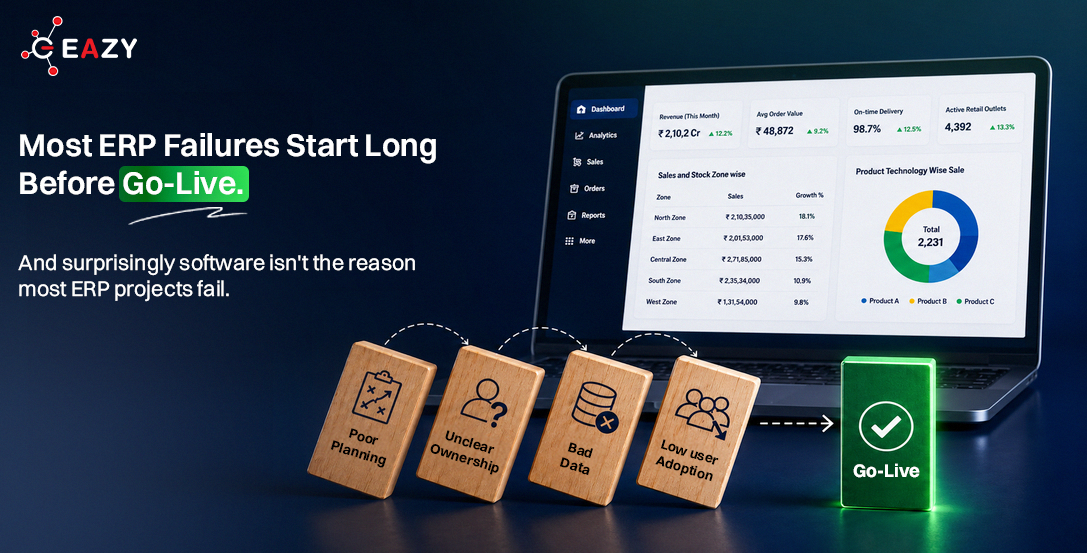
Here’s something most ERP vendors won’t tell you: By the time an ERP project reaches go-live, success or failure has usually already been decided. Not during deployment, not during training, and even not during user testing but much earlier. It gets decided when business goals are unclear, when departments aren’t aligned, when poor-quality data is migrated, and when implementation is treated like an IT project instead of an operational one.
If you’re planning ERP implementation, this 10 steps checklist will help you avoid the mistakes by bypassing the foundational mistakes that trigger chronic delays, cost overruns, and low adoption long before you hit the power switch.
What Is ERP Implementation?
ERP implementation is the process of configuring, deploying, testing, and adopting an ERP system across finance, inventory, procurement, sales, distribution, and reporting functions.
A successful implementation is never measured simply by whether the software goes live. True ROI is determined by whether your teams actually use the system daily, trust the data inside it, and make faster, more profitable operational decisions because of it.
ERP Implementation Checklist
Step 1: Define Business Objectives Before Selecting ERP
Checklist:
- Identify business problems ERP must solve
- Define measurable success metrics
- Align leadership expectations
- Establish implementation timeline
Why it matters: Before shortlisting vendors, write down the exact problem your business is trying to solve. Most Indian ERP projects fail not because the software was wrong but because the problem was never clearly defined.
Ask questions such as: Where do decisions get delayed? Is it secondary sales visibility? Distributor claims reconciliation? Inventory mismatches between DMS and SFA? Which manual processes need automation? Which departments need visibility improvements? What reports are currently difficult to generate? What business outcomes should ERP improve?
Evaluate vendors on: localisation depth, distribution management (DMS) integration, SFA connectivity, and implementation support quality, not just software features. Choosing a system built for your current and near-future operational reality is often more valuable than buying enterprise-scale complexity too early.
Step 2: Build a Cross-Functional ERP Team
Checklist:
- Executive sponsor
- Project owner
- Finance representative
- Operations representative
- Sales representative
- IT representative
- External implementation partner
Why it matters: ERP is not an IT project, it is a business transformation project. Appoint an internal project owner, typically a COO, VP Operations, or Head of Finance. Then build a team with at least one representative each from: finance, sales, operations, IT, and distribution. In Indian FMCG businesses, include the field sales and distributor management team from day one.
ERP implementation cannot be delegated entirely to IT or a vendor. Leadership involvement is often the difference between successful adoption and another software project that never delivers its intended value.
Step 3: Map Existing Processes
Checklist:
- Procure-to-pay
- Procure-to-pay
- Inventory management
- Sales workflows
- Approval structures
- Reporting requirements
Why it matters: Document what actually happens in your business today, not what should happen. Map your order-to-cash cycle, your procurement flow, your stock movement from factory to distributor to retailer.
This process mapping step is consistently skipped by Indian companies in a rush to go live. It always costs more time later. ERPs are configured around real processes, not ideal ones.
Step 4: Clean and Validate Business Data
Checklist:
- Customer master
- Vendor master
- Product master
- Opening balances
- Historical transactions
Why it matters: Clean data is the foundation of a successful ERP rollout. Businesses often underestimate how much manual work and data reconciliation accumulate over time when systems are disconnected.
Identify bottlenecks, duplicate activities, approval delays, and manual dependencies across sales, procurement, inventory, production, distribution, finance, or customer service. This stage often reveals operational gaps businesses were previously unaware of.
Step 5: Validate GST and Compliance Requirements
Checklist:
- GST configuration
- E-invoicing readiness
- E-way bill integration
- Tax reporting validation
- Compliance workflows
Why it matters: Before go-live, ensure your ERP can automatically generate e-invoices and e-way bills, handle GST compliance across states, and support accurate tax reporting. Just as important, spend time cleaning customer, vendor, product, and GST master data before migration. Many ERP projects face avoidable delays because poor-quality data is moved into the new system without validation.
Step 6: Configure ERP Around Business Processes
Checklist:
- Workflow design
- Approval hierarchy
- Role permissions
- Report configuration
- Dashboard setup
Why it matters: Not all ERP systems are built for Indian regulatory requirements. Your ERP must handle GST (including e-invoicing, e-way bill generation, and GSTR filing), TDS/TCS, multi-state tax structures, and if you are in FMCG or distribution, EPR compliance tracking from FY 2025–26 onward.
Step 7: Train Users Early
Checklist:
- Department-wise training
- Process walkthroughs
- Mobile app training
- Role-based access training
- Documentation
Why it matters: Most adoption problems begin because training starts too late. The people who will use your ERP daily are warehouse staff, sales reps, finance executives, and distributors. Training must be role-specific, conducted in the user’s working language where necessary, and followed up with refreshers after go-live.
In Indian field sales contexts, mobile-first SFA training is critical. If your field team cannot raise an order on the app in under two minutes, adoption will fail regardless of how good the backend system is.
Step 8: Conduct Pilot Testing
Checklist:
- End-to-end transaction testing
- Inventory validation
- Financial validation
- User acceptance testing
- Exception handling
Why it matters: For a minimum of two to four weeks before go-live, run your new ERP alongside your existing system, compare outputs daily, and reconcile mismatches. This parallel-run period surfaces configuration errors, data gaps, and user adoption issues before they become live business problems.
Before company-wide deployment: Test workflows, validate reports, verify integrations, review approval processes, check inventory transactions, simulate real business scenarios. Pilot testing helps identify operational issues before they affect daily operations.
Step 9: Complete Go-Live Readiness Review
Checklist:
- Data validated
- Users trained
- Workflows approved
- Support team assigned
- Escalation matrix defined
Why it matters: Phased rollouts consistently outperform big-bang go-lives in Indian business contexts. A recommended phasing approach:
- Phase 1: Finance and inventory (core ERP)
- Phase 2: Distribution management (DMS) secondary sales visibility
- Phase 3: Field sales automation (SFA) beat plans, order capture, outlet coverage
Each phase should have a defined go-live date, UAT period, and a clear rollback plan if critical issues emerge.
Step 10: Monitor Adoption After Go-Live
Checklist:
- User activity tracking
- Transaction monitoring
- Process compliance review
- Weekly improvement meetings
- Adoption KPIs
Why it matters: Go-live is not the finish line. It is the beginning of the highest-risk period. In the first 30 to 60 days, have your implementation partner on standby, daily check-ins, a dedicated escalation path, and a clear SLA for critical bug resolution.
In Indian distribution businesses, the first month-end after go-live is the real test. GST reconciliation, distributor claim settlement, and secondary sales reporting all converge. Be ready. Track user adoption rates, process compliance, reporting accuracy, system usage, workflow completion times etcetera. Businesses that actively monitor adoption typically achieve better ERP outcomes than those that treat implementation as a one-time project. Adoption is also one of the biggest drivers of long-term ERP ROI.
Common ERP Implementation Mistakes
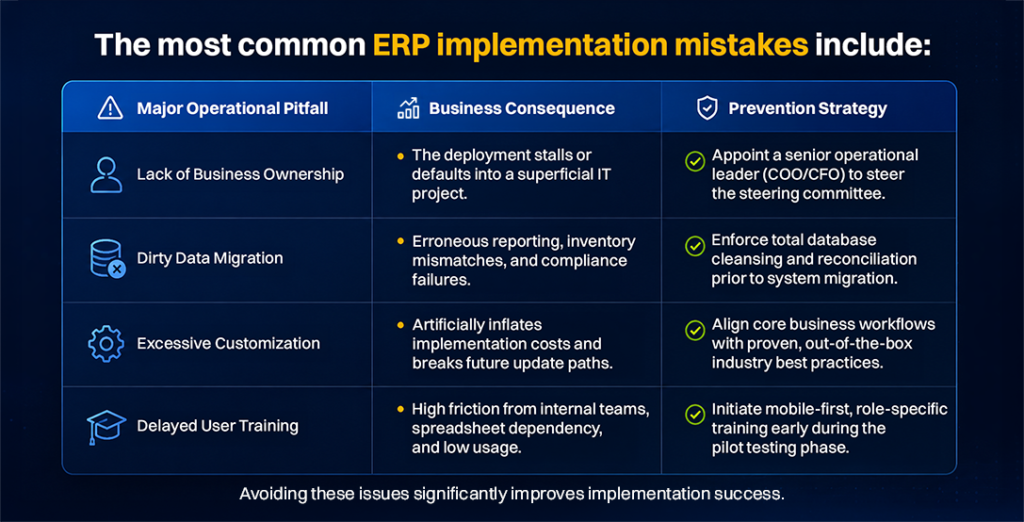
Avoiding these issues significantly improves implementation success.
ERP Implementation: Key Facts at a Glance
- Typical ERP implementation timeline: 3–6 months for core modules within standard Indian mid-sized setups.
- Biggest implementation risk: Low user adoption on the ground and unverified data migration routines.
- Average implementation cost: INR 10–30 Lakhs for typical mid-market configurations, scaling up based on multi-location complexity.
- Most important success factor: Comprehensive operational process mapping and standardizing workflows prior to vendor selection.
ERP Implementation FAQs
1. How long does ERP implementation take in India?
For Indian SMEs and mid-size companies, a phased ERP implementation typically takes 3 to 6 months for the core system. Expanding the architecture to feature advanced DMS and mobile SFA modules moves the total timeline to 6 to 9 months, while highly distributed, multi-location enterprise factories can take 12 to 18 months.
2. What is the biggest reason ERP rollouts fail in India?
The most common reason is poor data quality at the time of migration, especially incorrect GST master data, incomplete customer and vendor records, and unreconciled opening balances. The other most common reasons are lack of user training for field-level staff and excessive customisation.
3. Does ERP implementation in India require GST integration?
Yes. Any ERP deployed for an Indian business must support e-invoicing (mandatory for companies above ₹5 crore turnover), e-way bill generation, and GSTR reconciliation. Without this, the ERP creates compliance risk rather than reducing it.
4. How much does ERP implementation cost in India?
Costs vary widely by vendor, company size, and scope. Indian SMEs should budget INR 10 to ₹30 lakhs for a mid-market ERP implementation including software, configuration, training, and first-year support. Enterprise implementations for large FMCG or manufacturing companies typically range from INR 50 lakhs to several crores.
5. What is the difference between ERP, DMS, and SFA and do I need all three?
ERP manages your core business operations: finance, inventory, procurement. DMS (Distribution Management System) manages secondary sales, the movement of goods from distributors to retailers. SFA (Sales Force Automation) manages your field sales team’s daily activities. For FMCG and distribution businesses in India, all three need to be connected. Disconnected systems create data gaps that lead to poor decisions.
Final ERP Implementation Checklist
Before Go-Live, Ensure You Have:
- Business objectives defined
- ERP team established
- Processes mapped
- Data validated
- Compliance requirements configured
- Users trained
- Pilot completed
- Go-live approved
- Support structure established
- Adoption metrics defined
Most ERP failures are blamed on software. In reality, software is usually the last thing that goes wrong. Poor planning, weak ownership, dirty data, and low adoption create most implementation failures long before go-live. The businesses that succeed are rarely the ones with the most advanced ERP. They’re the ones that prepare for implementation properly.
Planning ERP implementation? Talk to an EAZY consultant about your specific industry: FMCG manufacturing, distribution or any other vertical.
→ Book a 30-Min Call with us.
At Eazy ERP, we help businesses implement connected ERP, DMS, SFA, and retail ecosystems designed for long-term adoption, visibility, and operational scalability.
References: